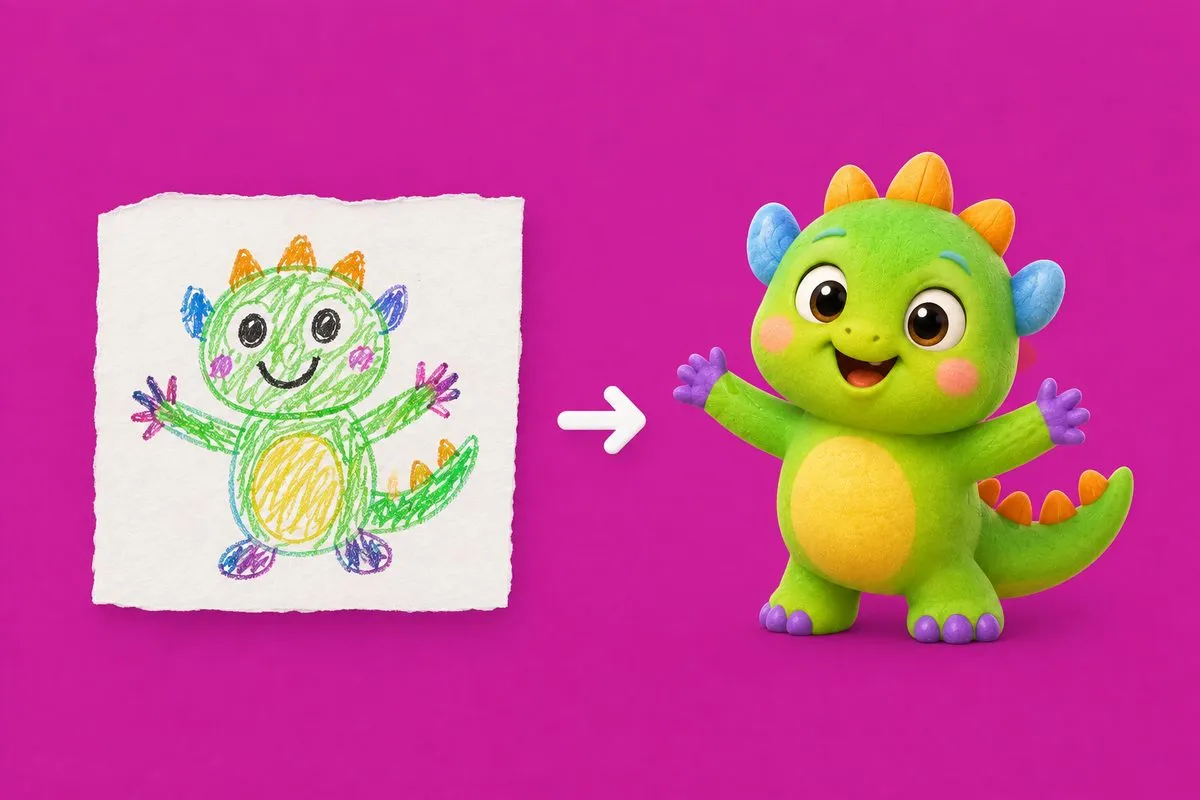
A four-year-old draws a green thing with a hat. It has six legs, one enormous eye, and a cape, because there is always a cape. It is the best thing in the house that week.
Turning that into a character who can then appear in a story tonight, a song on Saturday and a counting lesson next Tuesday is most of what the character-making half of Dinomy does. Here is what actually happens, in plain terms, and why some of the choices are the way they are.
A character is an actor, not a picture
The first thing to understand is that one image is not enough.
If all you have is the drawing, you can put the drawing on a page and that is it. What you need is something that can be seen from a different angle: waving, asleep, cross, standing next to a turtle at sunrise, holding a lamp. Every one of those is a new picture, and all of them have to look like the same individual.
So the drawing is not the character. The drawing is the brief.
The three ways in
There are three doors, and they all end in the same place:
- Describe it. You type what it is. “A small green dragon in a starry wizard hat with a purple cape.” No forms, no dropdowns — just the sentence.
- From a drawing. You photograph the drawing. The original is kept, so the app can always show you “made from this drawing” next to the character.
- From a photo. You photograph a favourite toy, a pet, a drawing — anything that matters. The photo is used once, for the one generation, and deleted immediately. It is never stored, never logged, never reused.
One thing this path deliberately does not do is draw your child. That used to be part of the plan and we removed it. The resemblance was hit and miss, and a permanent this-is-my-child character that misses is a standing disappointment in a family’s app. Your child stars in everything by name instead, which never misses.
Four takes, one character
The interesting step is what happens next. You do not get one result and a “try again” button. You get three or four versions of the same character — different takes on the hat, the shade of green, how big the eyes are — and you pick your favourite.
That distinction matters. They are options for one individual, not four different individuals to choose between. The child usually knows immediately which one is right, and letting them pick is worth the ninety seconds.
The part that makes it work later
Once you have picked, the app builds a small reference sheet for that character behind the scenes: a set of poses, expressions and angles. You never see it and you never manage it.
Everything afterwards is drawn with that sheet as a reference. That is why the dragon in Tuesday’s counting lesson has the same cape as the dragon in Saturday’s song, and why a story can put them on a beach at sunset and they are still recognisably themselves.
This is also the honest answer to “how consistent is it, really?” — consistency is not a promise about the model, it is an architectural decision. Every scene is conditioned on the same reference, so it holds.
Why every character lands in the same art style
This is the choice people question most, so it is worth explaining.
Whatever comes in — a description, a crayon drawing, a photograph of a toy lorry — comes out in one house art style. Not the style of the drawing. One style, for everything.
The reason is that characters have to share scenes. If your dragon is drawn in one style and the turtle in the lesson is drawn in another, every picture with both in it looks wrong. And because the character fronts the whole child’s side of the app, a mismatched style is not a one-off, it is everywhere, every day.
So: one art world. It costs you the crayon texture. It buys you a character that can go anywhere.
The drawing itself is not thrown away — it stays with the character as the thing it was made from, which is the bit families actually want to keep.
It does not have to be a creature
A truck. A pink ball. The one particular stuffed rabbit. Non-creature characters work, and they get friendly eyes and the ability to have an expression, so they can host a lesson without being uncanny.
Some of the best ones we have seen are objects. A four-year-old who has been carrying the same plastic dinosaur for a year does not want a new friend.
One character, everywhere
Once the character exists, it turns up in the stories, the songs, the lessons and the child’s own home screen — one of them is the companion, the face of the app for that child. Your child can pick which one, which is a small thing that delights them enormously.
And nothing you have already made changes. If you delete a character or swap the companion, last month’s story keeps its illustrations exactly as they were. Creations are immutable on purpose: a family should never lose a story because they made a new character.
That travelling character is also what makes the songs work — a song from someone your child already loves is a different object from a song from a stranger, which is the argument in why kids love hearing their own name in songs.
Make this in Dinomy
Open the character maker, pick a door — describe it, photograph a drawing, or photograph a favourite toy or pet — and give it a name. You will get three or four takes of the same character; pick the one your child points at. From then on, it stars in every story, song, lesson and music video you make, and it can be your child’s companion on their side of the app. Photos are used once and deleted immediately, the AI never draws your child, and everything you have already made stays exactly as it was.